The Dvorakist

A french developper's blog / portfolio dedicated to my passion for Linux, software development, frugal computing, and electronics.

THIS IS A DRAFT

How/Why do I got into "US Layout"

The standard

This layout is the default in computing.
It kinds of serve as a basis for it as it contains only and every keys used in programing languages.

Better know it when you need it

It means sometimes when you're tweaking your system or when something goes wrong you can get droped to an emergency shell without your habitual keyboard layout and usually without a mean to load one (at least not easily or directly, or the commands you know aren't avalaible).
So without a reference of the us-layout on hand you can get lost when trying to find the symbols you want to type.
This is getting annoying because of the slowness of typing in those frustrating conditions...

But I mean it more in a sense of exploration, because nobody needs to learn a new layout to repair anything.
If the paragraph above makes you think about initramfs shell, I know most of the time the solution is not the dracut shell but a reboot on a live OS and track and fix the source of the issue.

Realisation

So comming from a standard Azerty French Keyboard, the more I looked at the US layout the more I realized something.

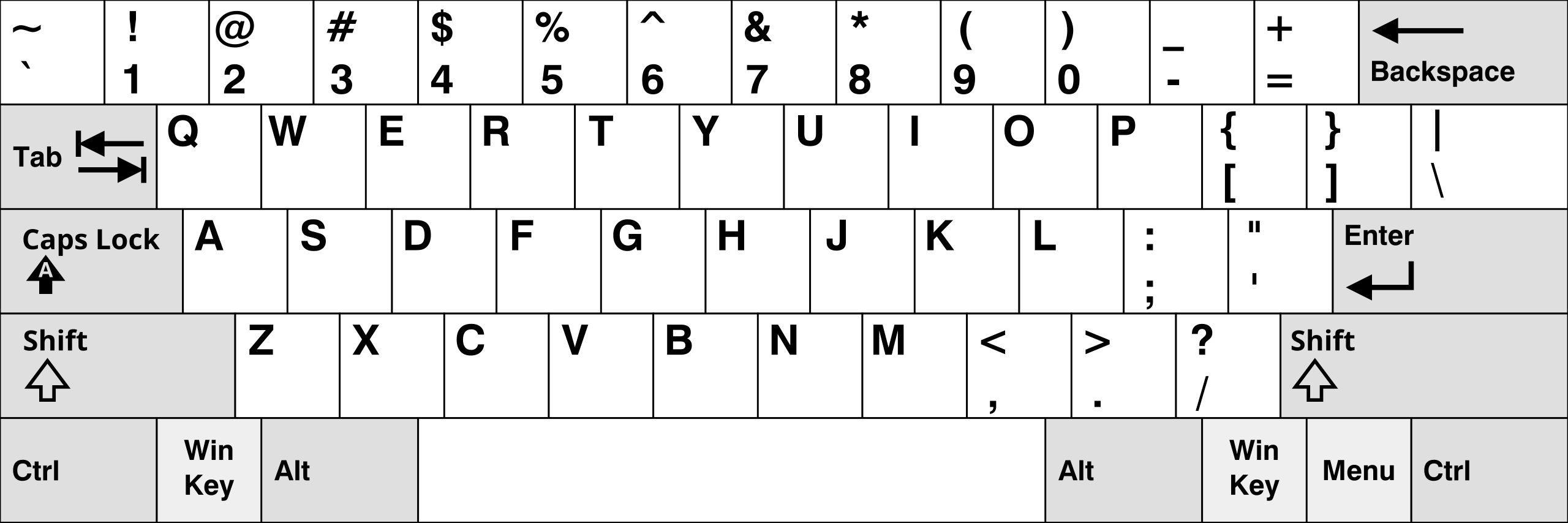
Standard US Qwerty

As the US querty layout is more or less the first that was created it's serving as a basis for the others to divert from.
Also English contains few symbols (no accents, cedillias...) so it is very clean and well designed.

Especially when it comes to what I call "symbols pair associations".
By this expression I mean the the way in which it binds two symbols together on the same key using the "shift" modifier but also where some naturally paired symbols like the parethesis could be placed next to each others.
Compare those placements with the french layout for example or any other languages and you will see that US is the easiest.
You do not have a third layer (like AltGr in french layout).
The locations of the keys for special characters make sense and are very easy to lean.

Exemples:

  • dot and coma next to each others
  • < and > next to each others
  • single and double quote on the same key
  • minus and underscore on the same key
  • square brackets and curly braces on the same key
  • colon and semi-colon on the same key
  • backslash and pipe on the same key

Counter Examples :

  • Slash with Question mark...

Also some things could be better : the brackets and braces should be aside the parenthesis, their positions exchanged with minus and equals.
Some other layout have already done this, see dvorak below.

How to type accents and 🌏foreign or special characters

🗺️Us International

There is a layout called us-intl that uses AltGr and Shift+AltGr as a third and fourth layer for typing a lot of symbols but I don't want to learn it.

📝The Compose Key

Instead what I like to do is to use what is called a "Compose Key".

Where to find it

The compose key is a feature of xkb.
It's shiped with X11 but some of his configuration options are also supported on some wayland compositors so you can use it on any system using them.

How to use it

You can configure any key to be the Compose Key, what I use is the Right Alt key (mimics AltGr to keep it simple).
What the Compose Key does it to combine graphics shapes of symbols (by typing coresponding key sequentially when maintaining the Compose Key) to approximativelly match the shape of the caracter you want to type.

Examples
  • e + ' => é
  • e + ` => è
  • e + " => ë
  • c + , => ç
  • o + c => ©
  • t + m => ™
  • = + / => ≠

Conclusion

Despite all of that the Qwerty layout for letters still has many flaws dating back from early typewritters.
We'll adress that on the next section.

What is Dvorak

Presentation

Dvorak is a re-arangement of the US Qwerty layout.
Which means all symbols pair on all keys are absolutely identical to us-layout, but most keys are relocated.
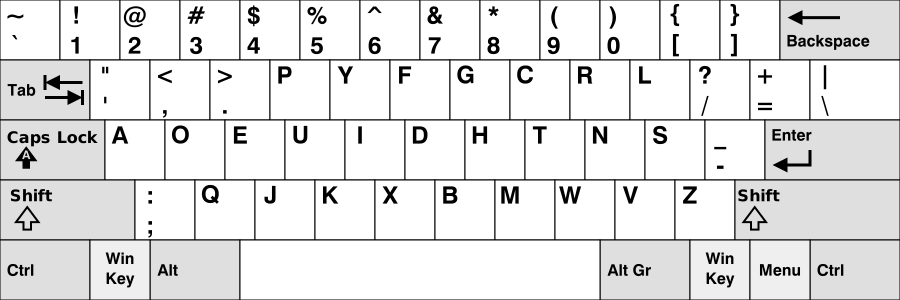
Dvorak layout

Purpose

It was created in an attempt to improve the comfort and the efficiency when typing by reducing the movement of fingers.

Method

It acheive this by cleverly placing the keys on the layout depending on how often a letter is present in english texts.
Basically it avoids you to have to leave the "home-row" too often and it encourages Left/Right hand alternance.
All the voyels and punctuations are on the left side
Most consonants on the right side

Feeling

You almost always type each following letter in a word with the other hand.
It's keep going back and forth and rarely leaving the home row

Variants

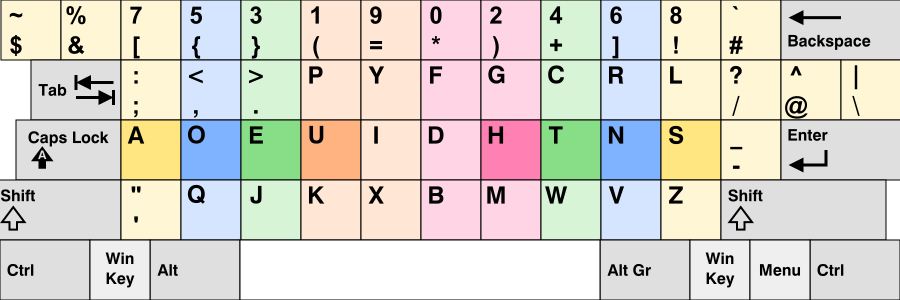
Programer's Dvorak

I got inspired by a layout called "programer's Dvorak" which separate numbers in two groups : odd and even.
But I didn't liked how they changed symbols...

Dvorak programmer variant

Touch-typing and Ergonomics

I firmly beleive practicing it without using the touch-typing method is uselessly harder and defeat the purpose.
Here a link to learn it in 2 to 3 weeks by 1h per day (comming soon).

Easiest to learn with ortholinear keyboards

Ortholinear Keyboards have a orthogonal matrix shape with linear columns, perfectly aligned instead of staggered columns like on standards keyboards
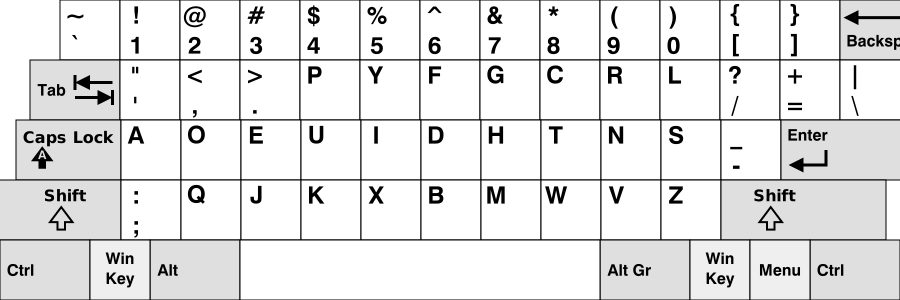
Orthonormal dvorak
Why ?

It's easier for the fingers to travel on and find the correct position when trying to touch-type, and it leads to less pain if you've been fast touch-typing heavily for too long.

But it is still perfectly OK to touch type on standard keybords once you've learned it on an ergonomic one.

Tips for new learners

A tip to help you avoiding to return to old habits when trying to learn a new layout is to learn it on an ergonomic keyboard without letters printed on !
I never liked "by heart" learning when I was young, especially when there is no logic behind. I asure you that learning a new keyboard layout is easier that you may think if you do it the right way :
muscle memory will do all the work for you without you even notice it.

From now on I will use Ortholinear representation to show the keymaps.
It is for clarity when looking at how they are designed.
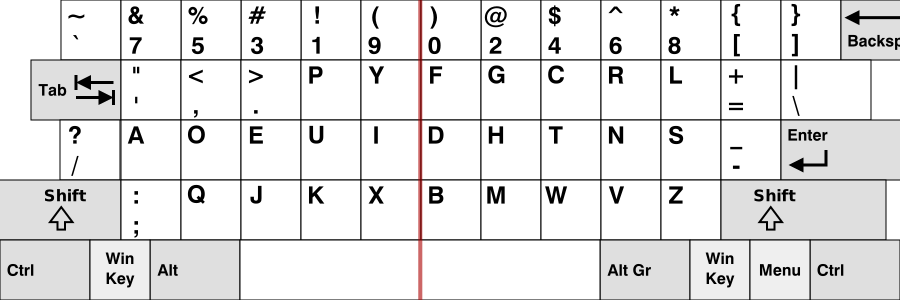
What I'm Using

I use a modified dvorak layout.
I choose to rebind the CapsLock to something more useful :
The "/?" key.
As i moved the /? key, I put equals-plus just there, above the minus sign, quite handy.
The \| key can take the place left by the equal-plus key.
The rightest key, above enter is currently not used and left empty.
I use the odd numbers with the left hand and the even numbers in the right hand.

My personal revision of the dvorak layout

I want ortholinear and symetry both in the form itself and in the mappings.
The last thing that bother me is the shift on the pinky.
But I will not address this issue on standard keyboards.
This is as far as I can get on rebinds for a standard keyboard.
Ergonomic custom builds are a better for that.